

Server types
Compute → Server Types lists the sizes your project can launch, with the GPU model and count, GPU memory, vCPUs, RAM and location of each.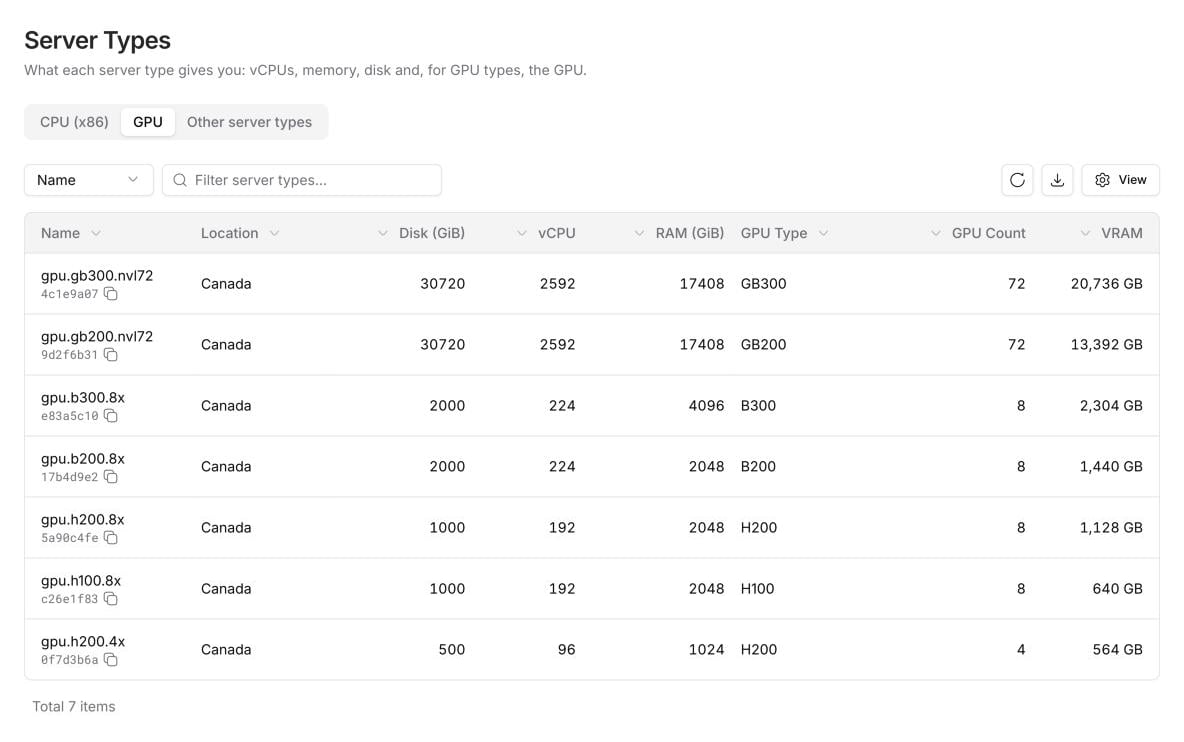
Images
Compute → Images lists the operating systems a server can boot from. GPU images show the CUDA and NVIDIA driver versions they come with. In the launch form, you only see the images that fit the hardware you picked. The ready-made GPU images:- are ready for GPU work as soon as they boot, with no driver installation;
- come with or without PyTorch preinstalled; with it, PyTorch is in a virtual environment at
/opt/pytorch; - include GPU monitoring, which powers the GPU tab on your server’s page;
- log in as the user
ubuntuwith your SSH key.
Image tabs
The page has three tabs: the ready-made images, your project’s own images (such as server snapshots), and images another project has shared with yours.Related
Launch a GPU server
Pick a GPU, an image and a system disk.
Servers
Launch, connect, park and delete servers.
Storage
Volumes, volume snapshots and volume backups.
Jupyter on your GPU
Run notebooks through a secure SSH tunnel.